
Verify a prescription
Available to
Pharmacy professionals.A pharmacist reviews every submitted prescription before anything is dispensed or given. Only users with the Pharmacy Professional role can verify.
Verify
- Open Pharmacy → Prescriptions and select Awaiting Verification in the filters.
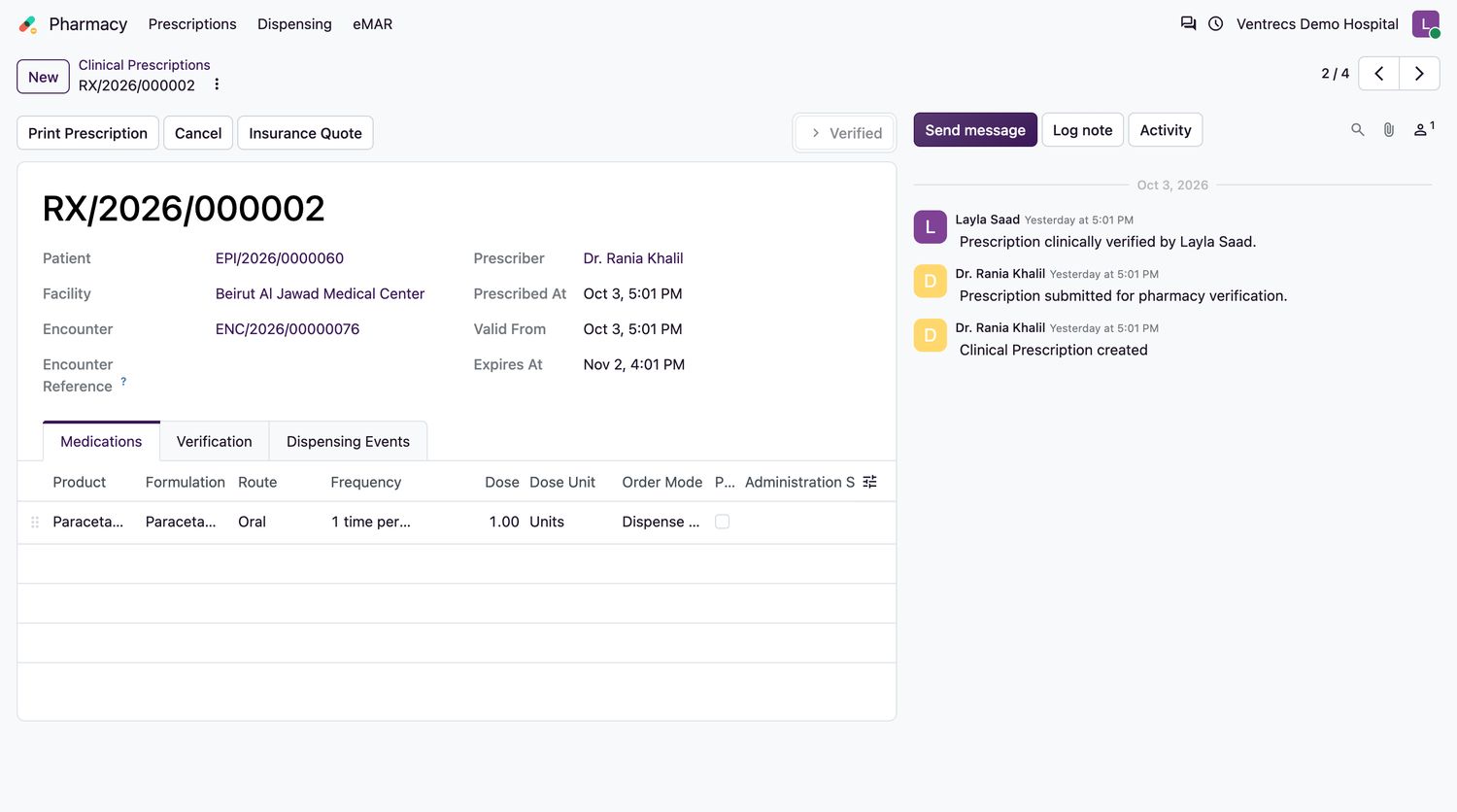
- Open a prescription and review each line: the product, formulation, dose, route, frequency, quantity and instructions. Check the patient's allergies and clinical alerts.
- On the Verification tab, add a Verification Note if needed.
- Select Verify. Your name and the time are recorded, and the state becomes
Verified. - To refuse, select Cancel and enter the Cancellation Reason.
Rules
- An expired prescription cannot be verified.
- When independent verification is required for the organisation, the person who verifies must be different from the prescriber.
- A prescription that has been dispensed cannot be cancelled until everything dispensed is returned and pending stock transfers are resolved.
- Select Check Safety before you verify to see the allergy, interaction, duplicate-therapy and refill-too-soon alerts for the prescription. See Run the pharmacist check and decide safety alerts.
The Insurance Quote button shows what the patient and the insurer would pay, when billing is enabled.
Related topics
Was this helpful?
Thank you. Your feedback is recorded.Thank you. Tell us what is missing so we can fix this guide.
Report an issue with this guide