
Set up safety rules, reasons and counselling topics
Available to
Pharmacy managers and pharmacy directors.The counter's safety checks run on content that your organisation approves: interaction rules, the allergy mapping, the reasons offered for an override, the counselling topics and the return reasons. Nothing clinical is supplied with the system. What is installed is marked as a sample, and your pharmacy director must load and approve the real content before go-live.
Open Settings → HIS Pharmacy. The Pharmacy Counter Safety Checks section has these settings.
Counter safety settings
| Setting | What it does |
|---|---|
| Block a sale on a major alert | A major allergy or interaction must be overridden with a reason before payment. |
| Acknowledge moderate alerts | A moderate interaction, a duplicate therapy or a refill too soon must be acknowledged with a reason before payment. |
| Require a counselling record | A prescription item cannot be paid until counselling is recorded as given or declined. |
| Refill threshold | The percentage of the previous supply that must have been used before a refill is allowed without a reason. The installed value is a sample: set the rule your payers and regulator apply. |
| Current medicine window (days) | A medicine dispensed within this many days counts as one the patient is taking now. |
| Match allergies by name | When an allergy is not mapped to ingredients or classes, compare its text with ingredient, synonym and class names. |
| Interaction content | Where interaction rules come from. Content must come from an approved, licensed source. |

Interaction rules. Open Pharmacy → Configuration → Interaction Rules. A rule names two ingredients or classes, a severity, the effect, what to do, its source and source version. Either side can be one ingredient or a whole class, and a rule works in both directions. A rule moves from Draft to Approved, and Retire ends it.


Import interaction rules
- Open Pharmacy → Configuration → Import Interaction Rules.
- Upload a CSV file with the columns
a,b,severity(major, moderate or minor),effectandsource, and optionallymanagementandsource_version.aandbare an ingredient code or name, orclass:followed by a class name or code. - Select Import. The rules are created as drafts.
- A pharmacy manager reviews each draft and approves it. Only approved rules are used at the counter.

Allergies. An allergy matches a medicine through the ingredients and classes mapped to the allergy concept: on the concept, Allergy: Ingredients and Allergy: Classes. See Manage approved clinical concepts.
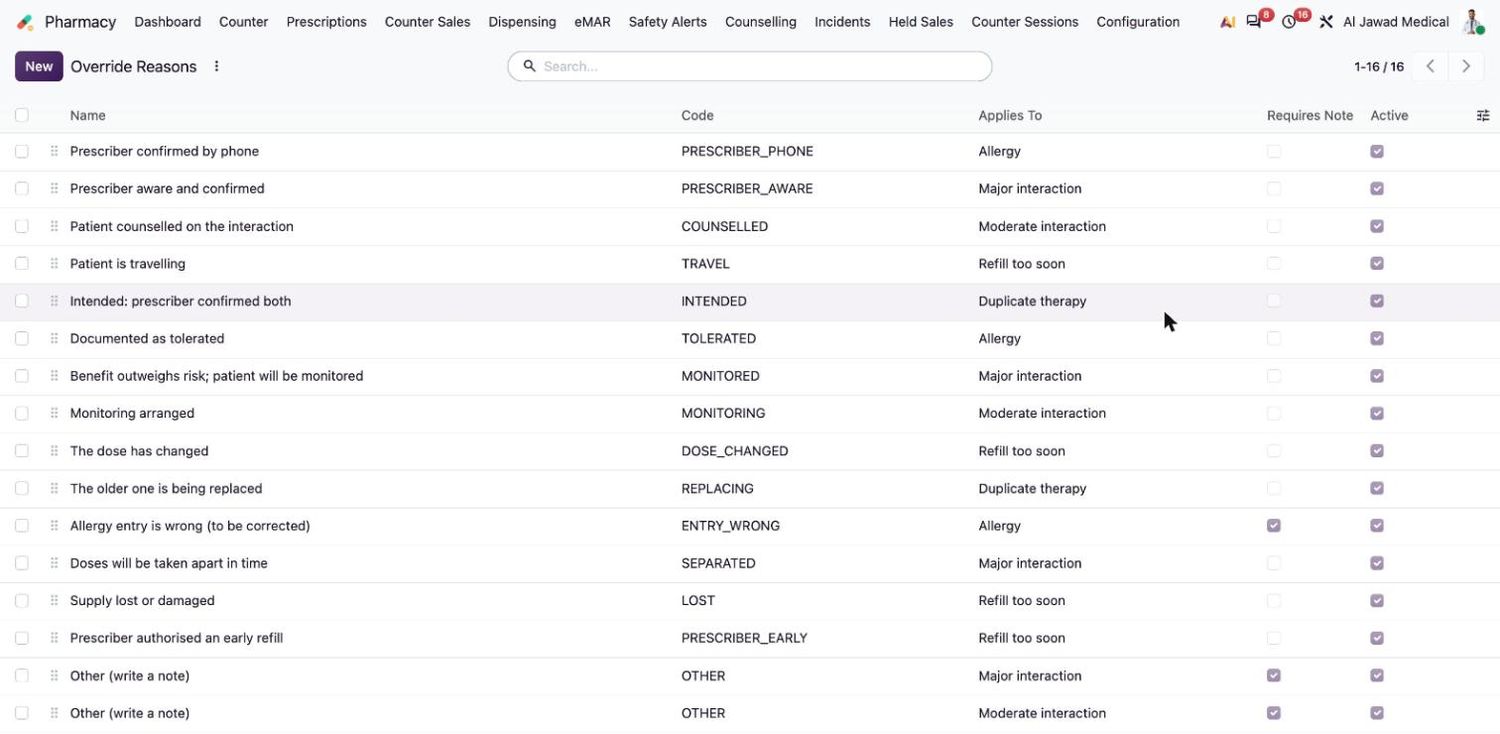
Override reasons. Open Pharmacy → Configuration → Override Reasons. Each reason applies to one kind of alert (allergy, major interaction, moderate interaction, duplicate therapy or refill too soon) and can require a note.
Counselling topics. Open Pharmacy → Configuration → Counselling Topics. Each topic has a name, a code and the text to say. A topic can be limited to certain ingredients or classes.

Return reasons. Open Pharmacy → Configuration → Return Reasons. For each reason you decide whether the item goes back to stock, whether it may be a prescription item, whether the batch is quarantined and whether an incident is logged, and which kind.

Related topics
Was this helpful?
Thank you. Your feedback is recorded.Thank you. Tell us what is missing so we can fix this guide.
Report an issue with this guide