
Hold and resume a sale
Available to
Pharmacists and pharmacy assistants working at the counter.Hold a sale while the patient fetches something or waits for a call back, serve the next person, and come back to the first sale later. Held sales can be resumed in any order.
Hold and resume
- With the sale on screen, select the + button at the top. The sale you were working on stays open and a new sale starts.
- The Held button shows how many sales are waiting.
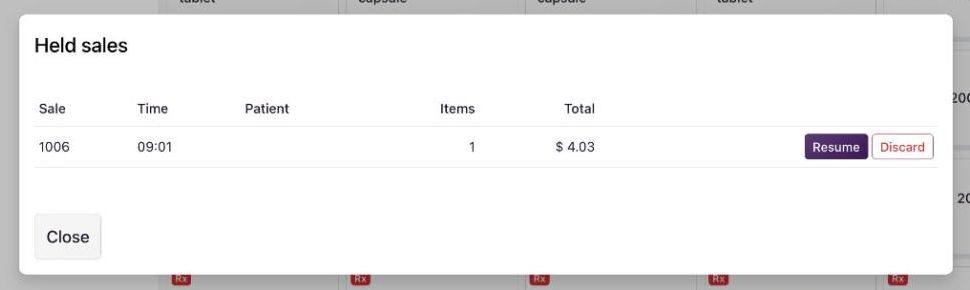
- Select Held. The list shows each sale's number, time, patient, items and total.
- Select Resume to carry on with a sale, or Discard to cancel it.
Good to know
- Nothing is reserved for a held sale. Stock and prescription quantity are used only when the sale is paid, so check again when you resume.
- A sale held for longer than the limit (8 hours unless your organisation changed it) is cancelled by a scheduled job.
- Resuming and discarding a held sale are logged. The back office list is under Pharmacy → Held Sales.
Related topics
Was this helpful?
Thank you. Your feedback is recorded.Thank you. Tell us what is missing so we can fix this guide.
Report an issue with this guide