
Record counselling
Available to
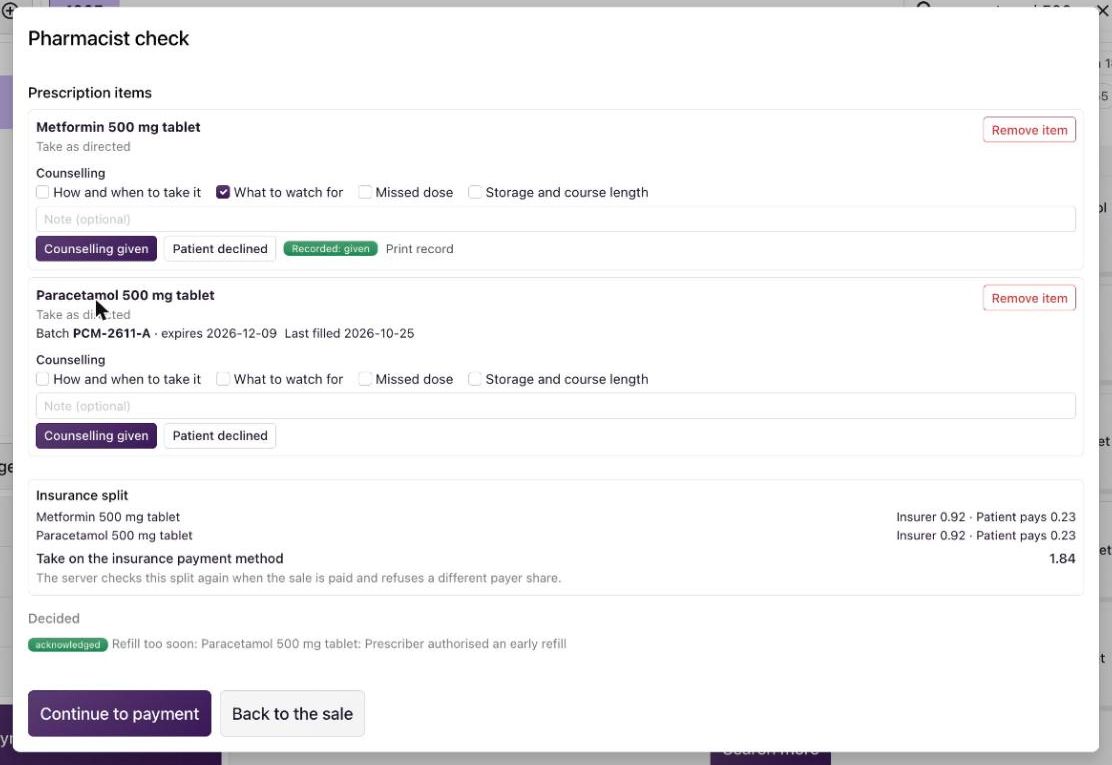
Pharmacists.For each prescription medicine, the pharmacist records whether counselling was given or declined. The record is kept with the dispensing event and can be printed.
Record counselling
- In the pharmacist check, find Counselling under the medicine.
- Tick the points you covered: How and when to take it, What to watch for, Missed dose, Storage and course length. Add a note if it helps.
- Select Counselling given. If the patient does not want counselling, select Patient declined instead. Declining needs no ticked point.
- A green Recorded: given (or Recorded: declined) appears with Print record. Select Print record for the printable counselling record.
Good to know
- Counselling given needs at least one ticked point, or choose Patient declined.
- When your organisation requires counselling, the medicine shows Required before payment until an outcome is recorded.
- Review the records under Pharmacy → Counselling: the time, patient, medicine, outcome, points covered and pharmacist.
- The wording of each point comes from Counselling Topics. The topics installed with the system are placeholders until your pharmacy director approves the text.

Related topics
Was this helpful?
Thank you. Your feedback is recorded.Thank you. Tell us what is missing so we can fix this guide.
Report an issue with this guide