
Record diagnoses
Available to
Clinician and authorised care users.A diagnosis links the patient, the encounter and an approved code from the clinical code system, such as an ICD-10 code. Only a clinician can confirm it.
Record and confirm a diagnosis
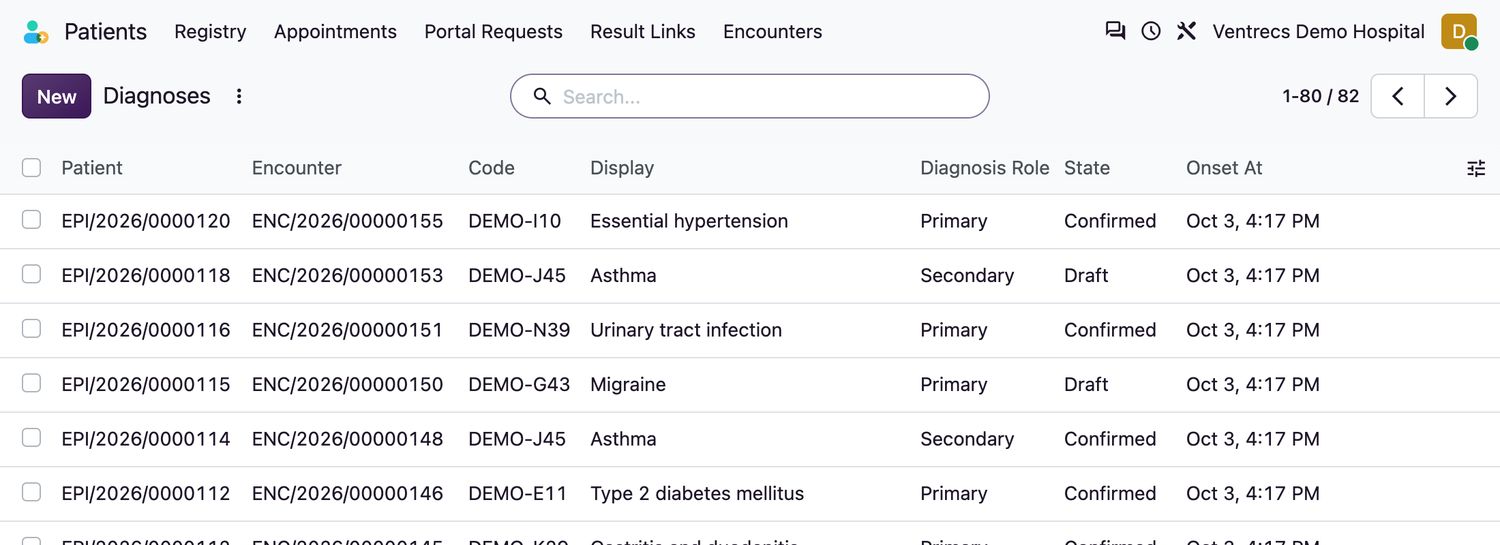
- Open Clinical → Diagnoses and select New, or add the diagnosis from the patient's Clinical Summary tab.
- Choose the Patient and the Encounter.
- Choose the Concept (the code). The code, the code system, its version and the display name are filled in for you.
- Choose the Diagnosis Role:
Primary,Secondary,AdmittingorDischarge. - Set Onset At if known, then Save. The diagnosis is a
Draft. - A clinician selects Confirm. The state becomes
Confirmed.
| State | Meaning |
|---|---|
Draft | Entered, not yet confirmed. |
Confirmed | Confirmed by a clinician. Cannot be deleted. |
Refuted | Ruled out. |
Entered in Error | Recorded by mistake, with an audit reason. |
Related topics
Was this helpful?
Thank you. Your feedback is recorded.Thank you. Tell us what is missing so we can fix this guide.
Report an issue with this guide