
Review emergency access
Available to
Privacy officers.Every emergency (break-glass) access to a sensitive patient must be reviewed afterwards. The review list is how a privacy officer confirms the access was justified.
Review an access
- Open HIS Administration → Emergency Access Review.
- Read each row: the patient, facility, user, Purpose Of Use, when it was requested, when it expires, its State and Review State.
- Open an entry and read the Reason the user gave. Note when the notification was sent (Notification Sent At).
- If the access should end immediately, select Revoke.
- Enter the Review Note with your conclusion and select Close Review. Your name and time are recorded.
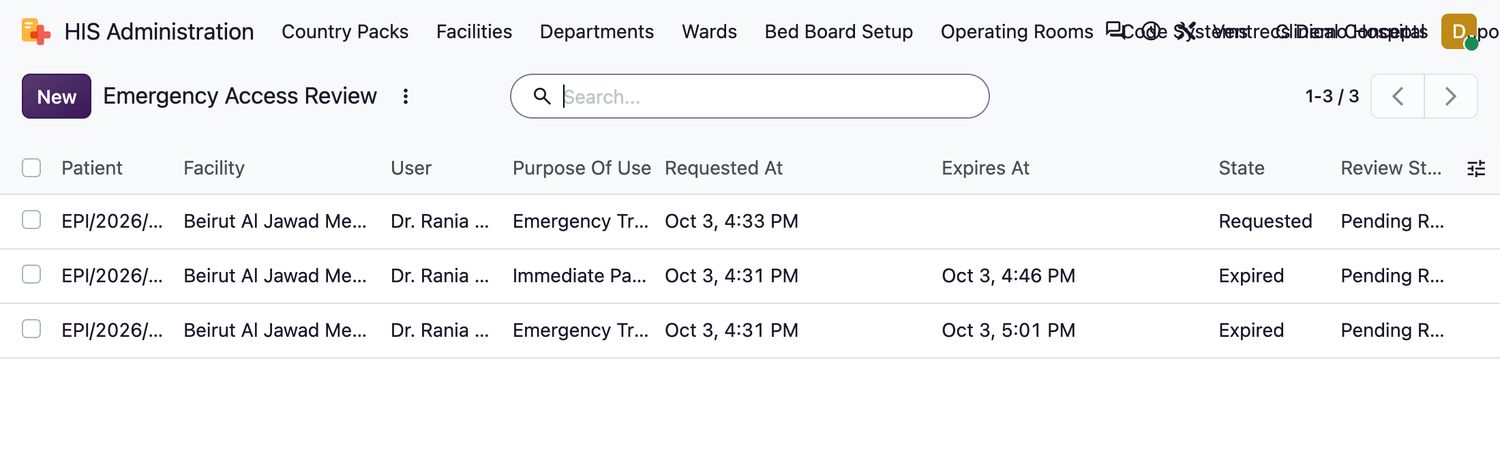
Access states
| State | Meaning |
|---|---|
Requested | The user asked for access. It can be activated with Activate Emergency Access. |
Active | The user can open the chart until it expires. Access lasts at most 60 minutes at a time. |
Expired | The time ran out. |
Revoked | Ended early by a privacy officer. |
For the user's side of this, see Handle urgent access and sensitive records.
Related topics
Was this helpful?
Thank you. Your feedback is recorded.Thank you. Tell us what is missing so we can fix this guide.
Report an issue with this guide