
Review clinical audit activity
Available to
Privacy officers.The clinical audit trail records who did what, to which record, when, why, and whether it succeeded. Entries cannot be edited or deleted.
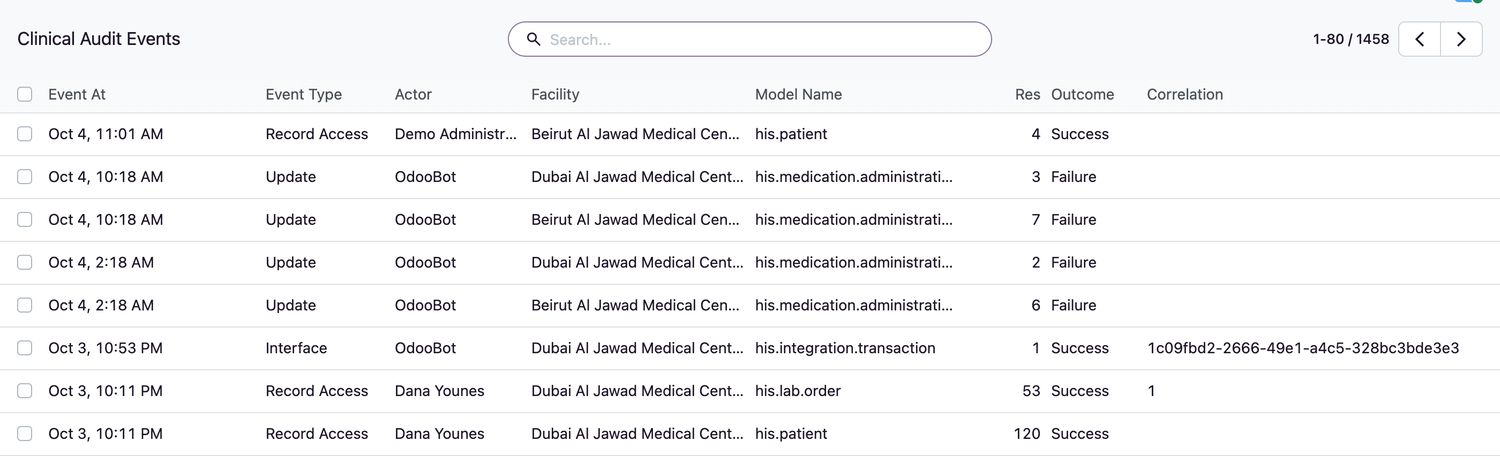
Search the audit trail
- Open HIS Administration → Clinical Audit. The newest events are first.
- Use the search box and the filters to narrow the list by Actor, Facility, Model Name, Event Type or Outcome.
- Open an event to see its Purpose Of Use, Reason and Correlation identifier, which ties together all events of one action.
Common event types
| Event type | Recorded when |
|---|---|
| Record Access | Someone opens a patient or a clinical record. |
| Create, Update | A record is created or changed. |
| Sign | A result, report, summary or other signed record is signed. |
| Security | A safety check failed, for example a wrong wristband scan. |
| Interface | A message is exchanged with another system. |
| Configuration | Controlled configuration or a release is changed. |
Related topics
Was this helpful?
Thank you. Your feedback is recorded.Thank you. Tell us what is missing so we can fix this guide.
Report an issue with this guide