
Manage nursing tasks
Available to
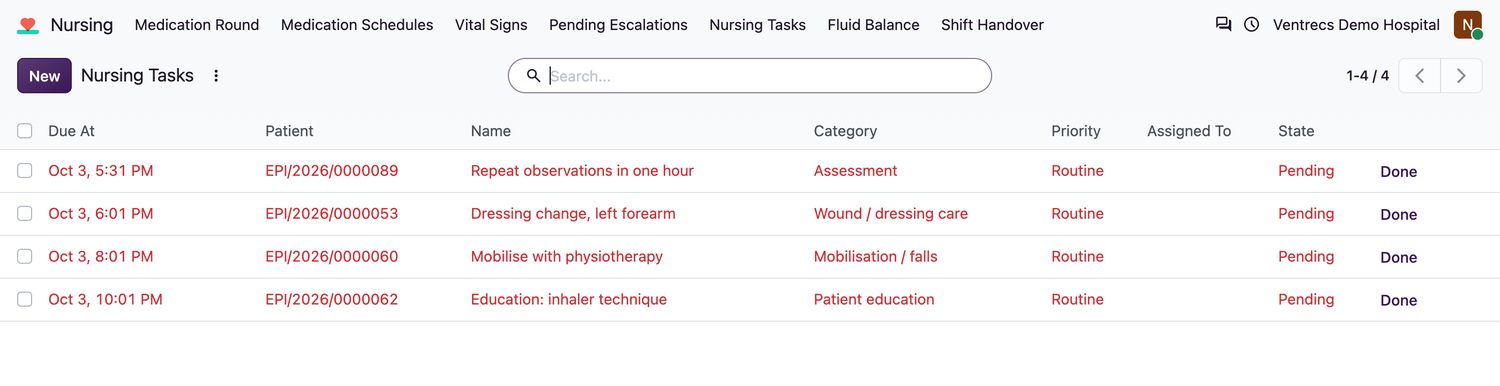
Nurses.Nursing tasks are the jobs a patient needs during a shift: dressings, mobilisation, line care, education and assessments.
Work with tasks
- Open Nursing → Nursing Tasks. Overdue tasks appear in red.
- To add a task, select New, enter the Name, Patient and Encounter, and choose the Category, Priority (Routine or High), Due At and, if needed, Assigned To.
- When the task is finished, select Done at the end of its row.
- If it will not be done, enter the reason in Outcome, then select Skip.
Good to know
- Completed and skipped tasks are records and cannot be deleted.
- A patient's overdue task count is shown on the Nursing tab of the encounter.
Related topics
Was this helpful?
Thank you. Your feedback is recorded.Thank you. Tell us what is missing so we can fix this guide.
Report an issue with this guide