
Set up operating rooms
Available to
Configuration managers.Operating rooms are the bookable resources of the theatre schedule. Each belongs to one facility.
Create a room
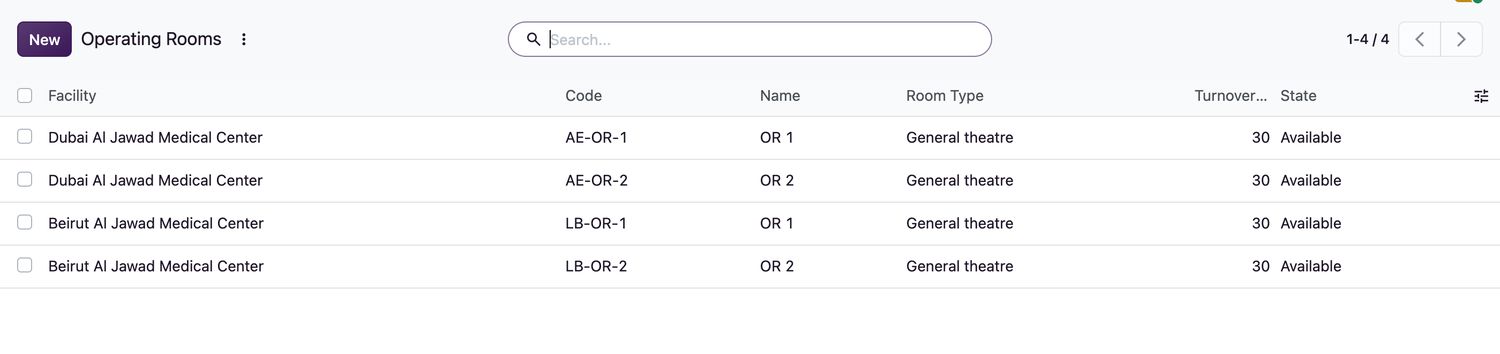
- Open HIS Administration → Operating Rooms and select New.
- Enter the Facility, Code, Name and Room Type (General theatre, Cardiac, Orthopaedic, Neurosurgery, Obstetric / gynaecology, Minor procedure room or Endoscopy suite).
- Set the Department (it must belong to the facility) and the Turnover Minutes the room needs between cases.
- Save. The room is
Availableand can be booked.
Room states
| Room state | Meaning |
|---|---|
Available | Can be booked and entered. |
In use | A patient is in theatre. Set automatically. |
Cleaning | The patient left for recovery. Select Mark Clean / Available when the room is ready. |
Maintenance | Out of use. Select Maintenance to set it; a room in use cannot be sent to maintenance. Mark Clean / Available returns it to service. |
Procedures offered on a case come from the procedure catalogue. A configuration manager approves procedures for production and can import the catalogue from a UTF-8 file with the columns code and name.
Related topics
Was this helpful?
Thank you. Your feedback is recorded.Thank you. Tell us what is missing so we can fix this guide.
Report an issue with this guide