
Retry outbox events
Available to
Integration operators.When something clinical happens, such as an order or a final result, Ventrecs writes an event to a durable outbox. A delivery service then sends it. If delivery fails, the event waits here so that nothing is lost.
Handle a failed event
- Open Integration → Outbox Events.
- Read the State, Attempt Count and Available At time. Open an event to read the Last Error.
- Fix the cause, for example an endpoint that was offline.
- Select Retry. Only a failed, dead-letter or stale leased event can be retried.
- If you confirmed the other system has already received it, select Mark Delivered.
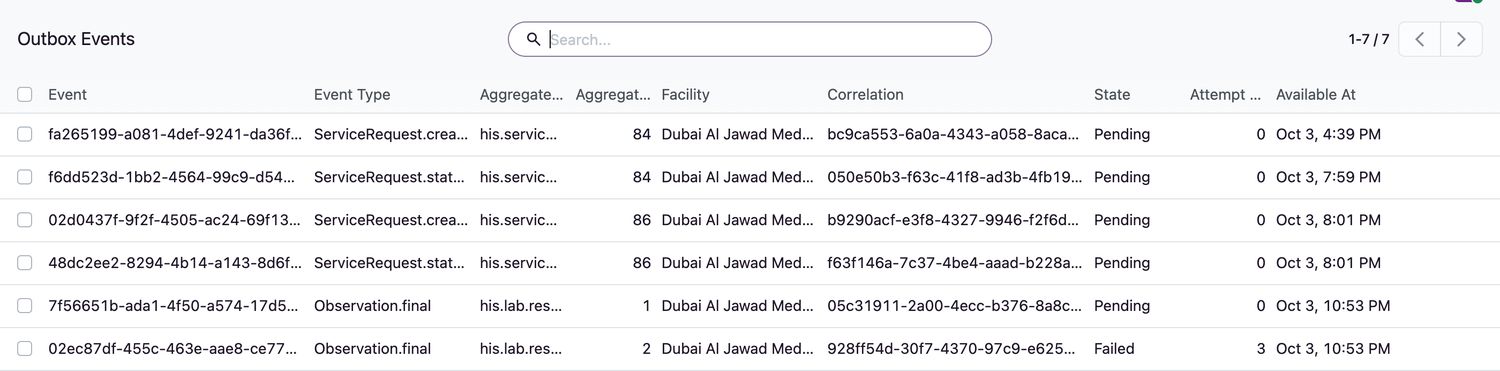
Event states
| State | Meaning |
|---|---|
Pending | Waiting to be delivered. |
Leased | A delivery attempt is in progress. |
Delivered | Delivered. |
Failed | The last attempt failed. It will be retried. |
Dead Letter | It failed too many times and needs your attention. |
Related topics
Was this helpful?
Thank you. Your feedback is recorded.Thank you. Tell us what is missing so we can fix this guide.
Report an issue with this guide